Zola and The Knot are the two names almost every engaged couple in the US hears first. Both are free, both have a wedding website, a guest list and a registry, and both have a highly rated phone app. So when it comes to Zola vs The Knot, which one should you actually use?
The honest answer is that they're built around different things. Zola is a registry company with excellent planning tools. The Knot is a vendor marketplace with excellent planning tools. And there's a third option many couples don't know about: Wonderland Studio, a planning suite built around the planning itself, where your website, guest list, seating, budget, run sheet, menu and decor all share the same information.
This guide goes beyond Zola vs The Knot and compares all three on what each company publishes, so you can see where each one is strongest and where you'd need to add something else.
Wonderland Studio is made by Wedded Wonderland, the publisher of this guide. We've compared it as fairly as we can, using each company's own published information, checked when this guide was last updated.
Wonderland Studio: the deepest planning tools of the three, all connected. Eleven tools in one account, culturally specific website templates, a seating planner with four exports, a run sheet, a menu planner and a costed decor list. 7-day free trial, then a subscription, with iOS and Android access through the Wedded Pro app. No registry.
Zola: the best registry of the three, with gifts, experiences and cash funds, plus a free website, guest list, budget, checklist, seating chart (free up to 15 guests) and vendor booking. The free app is iOS only.
The Knot: the biggest name in US vendor discovery, with a free app rated 4.9 on the App Store, a registry, free website, guest list, invitations and a huge vendor marketplace.
A "Yes" means the company's own site or app listing describes the feature. "Not listed" means we couldn't find it on their site, not that it's definitely missing.
Feature | Wonderland Studio | Zola | The Knot |
|---|---|---|---|
Cost | 7-day free trial with full access, then subscription | Free core tools, paid extras | Free app and website |
Wedding website | Yes, 6 culturally specific templates or blank | Yes, free | Yes, free |
RSVP form | Yes: meals, up to 5 named plus-ones, per-event RSVPs, auto-closing deadline | Yes: meals, plus ones, children, multiple events | Yes, with meal choices |
Guests need an account | Never | Not listed | Not listed |
Guest list linked to RSVPs | Yes | Yes | Yes |
Seating planner | Yes, only confirmed guests, 4 auto-seat helpers | Yes, free up to 15 guests, then $14.99 on iOS | Check current status |
Seating exports | Layout PDF, table-by-table PDF, master list CSV, place cards PDF | PDF or Excel | Not listed |
Seating QR code for guests | Yes, no app or login | Not listed | Not listed |
Budget tool | Yes, USD, EUR, GBP, AUD or CAD | Yes, free, syncs with Zola vendor bookings | Yes |
Checklist | Yes, 3 templates (15, 10 or 13 tasks) | Yes | Yes |
Day-of run sheet | Yes, multi-day, 12-moment template, share link | Not listed | Not listed |
Menu planner | Yes, dietary tags and allergens | Not listed | Not listed |
Moodboards | Yes, up to 20 boards | Not listed | Inspiration board |
Costed decor list | Yes, by zone, 6 currencies | Not listed | Not listed |
Calendar with reminders | Yes, pulls in tasks and timeline | Not listed | Not listed |
AI planning assistant | Yes, with live venue and vendor cards | Not listed | App within ChatGPT for vendor ideas |
Gift registry and cash funds | No | Yes, with zero-fee cash funds | Yes, with Venmo for cash funds |
Invitations and save the dates | Invite cards in Guests | Yes | Yes |
Native mobile app | iOS and Android (Wedded Pro app) | iOS only | Yes, on the App Store |
Vendor marketplace | Yes, Wedded Wonderland marketplace | Yes, book through Zola | Yes, very large |
Human help | Advisory Session ($258.75) and Wonderland Concierge | Team-Z advisors by chat or email | Peace of Mind Program for vendor cancellations |
Reading across, Zola vs The Knot is a close match, with both strong on the guest-facing and shopping side: registries, invitations, apps and vendors. Wonderland Studio goes much further on the planning side: what happens after the RSVPs come in.
Wonderland Studio is the couple-facing planning suite from Wedded Wonderland. It's eleven connected tools in one account: Website, Guests, Seating, Budget, Timeline, Tasks, Vendors, Calendar, AI Planning Assistant, Menu, and Decor & Moodboard.

This is the core reason to choose Studio. Here's what happened in our sample wedding with 56 invited guests:
RSVPs update the guest list: replies on the wedding website set each guest's status, meal choice and plus-ones in Guests.
Seating reads confirmed guests only: 48 guests confirmed, so the seating planner offered exactly 48 to seat.
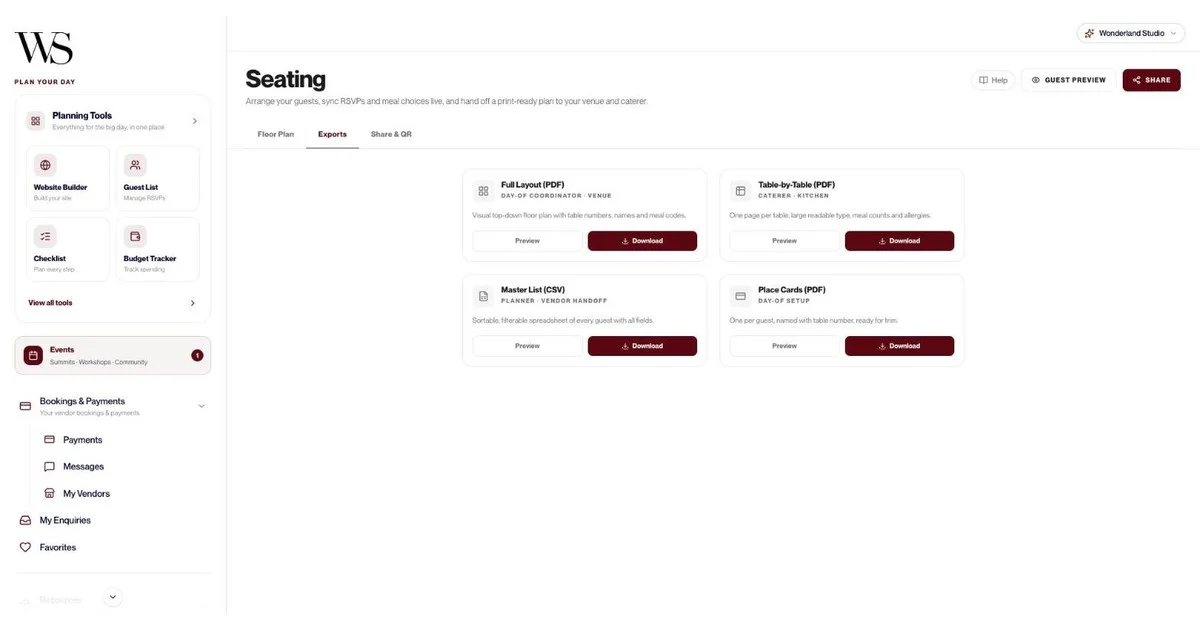
The caterer gets the details: the table-by-table seating export carried meal counts and allergies, one page per table.
The calendar fills itself: task due dates show as deadlines, and timeline moments show too, with filters for All, Deadlines, Appointments and Timeline.
Vendors are entered once: a vendor added once can be linked to tasks and assigned to moments on the run sheet.
Favorites become inspiration: venues and vendors you favorite in the marketplace can be pinned straight onto a moodboard.
Zola also connects some of its tools: its budget updates when you book vendors through Zola, and its seating chart pulls in confirmed guests. The difference is how far the chain goes. In Studio, one RSVP reaches the guest list, the seating plan, the caterer's sheets and the place cards.
Your guests. In Studio, the wedding website, RSVP form, timeline share link, moodboard share links and seating QR codes all work without anyone signing up. That matters most for older relatives and for international guests who'd rather not create another login.
No registry or cash fund: pair Studio with the registry you like best and link it from your website.
One login per wedding: partners share the account; "Assigned to" on a task is a label, not a separate login.
One budget and one menu: each account has one of each, and the menu has no PDF export or share link yet.
Paid after the trial: 7-day free trial with full access, then a subscription. If it lapses, nothing is deleted; the dashboard locks until you subscribe.
Here's the full feature list, as checked in the live tools.
Templates: Marigold & Gold (South Asian, with mehndi, sangeet, baraat and pheras), Emerald & Oud (Middle Eastern, with henna night, nikah and zaffe), Double Happiness (East Asian, with tea ceremony and banquet), Coastal Editorial (Mediterranean, with church ceremony and long lunch), Heritage & Bloom (African and Afro-Caribbean, with traditional ceremony, white wedding and jumping the broom), Modern Classic (Western), or a blank canvas.
Pre-filled content: each template comes with ceremonies, accommodation and FAQs for that tradition.
Editing: change content, colors and layout; edit, reorder or hide sections; upload photos.
RSVP form: meal choices, up to 5 named plus-one slots, per-event RSVPs and a deadline that closes the form automatically.
Publishing: Draft/Live toggle, preview and a public link.
Dashboard: confirmed, pending and declined counts, page views, and a CSV export of every RSVP with meals and plus-ones.
Ways to add guests: one by one, CSV import, email invites, a public link where guests register themselves, or invite cards.
Guest details: category (Wedding Party, Family, Friends, Colleagues, Other), party size 1 to 10, meal, dietary restrictions, plus-one, the city and country they're traveling from, arrival and leaving times, and accommodation notes.
Tracking: totals for Total Guests, Confirmed, Invited and Declined, search and filters, a "Timeline of Responses" table and CSV export.

Templates: Small (up to 75 guests), Medium (75 to 150) or Grand (150 to 300), in Classic Rounds, Long Banquet or Horseshoe, with a dance floor, stage, bar, buffet, cake table, gift table, photo booth and entrance.
Build from scratch: drag your venue's corners, use the grid, zoom and undo; tables of any shape; collision detection stops tables overlapping.
Helpers: Seat group together, Fill remaining seats, Balance table sizes and Suggest for unseated. "Fill remaining seats" placed 48 of 48 guests in one click in our test.
Exports: Full Layout PDF for your venue, Table-by-Table PDF with meal counts and allergies for your caterer, Master List CSV for your planner, and Place Cards PDF.
Share & QR: publish the plan, print the QR code, and guests find their table with no app or login. Guests see first names only; meals and allergies stay private.

Budget: Luxury Local or Luxury Destination templates, or your own number; USD, EUR, GBP, AUD or CAD; category allocations with due dates and an over-allocation warning; an expense log; Total Budget, Projected Spend, Funds Remaining and Total Invested; donut chart and "Allocated vs spent" bars.
Vendors: auto-fill from a Wedded Wonderland listing; 14 categories; contract status and link; total cost, deposit paid and balance due calculated for you; 1 to 5 star ratings; suggested vendors with average costs per category.
Calendar: month, week and year views; appointments with email reminders; task deadlines and timeline moments added automatically; a 30-day upcoming feed.
Timeline: Classic (12 moments), Intimate (7) or Destination (9) templates; multiple days; each moment with a time, duration, location, notes and assigned vendor; 13 categories from Preparation to Cake Cutting; a read-only share link and print to PDF.
Tasks: Classic (15 tasks), Intimate (10) or Destination (13) templates; priority, status, 9 categories, due dates, linked vendors and notes up to 2,000 characters; sorted by status, priority and due date.
Menu: dishes by course, including custom courses like "Aperitivo"; dietary tags (vegetarian, vegan, gluten-free, dairy-free, nut-free, halal, kosher, pescatarian); allergens; alternative options; wine or cocktail pairings; a dietary-coverage bar; CSV import.
Moodboards: up to 20 boards with 100 pieces each: images, color palettes, links, notes, venues and vendors; view-only share links you can switch off any time.
Decor list: costed by zone (8 zones in the starter, from the ceremony aisle to welcome bags), with quantity, estimated and actual cost, status and running totals, in USD, EUR, GBP, AUD, CAD or AED.

AI Planning Assistant: chat about venues, vendors, budgets and timelines, and see real Wedded Wonderland venue and vendor cards inline, plus a "Recommended for You" panel. It remembers details within a session.
Marketplace: your personal wedding edit of venues and vendors by country, a 12-question destination quiz, favorites, enquiries, messages, Bookings & Payments with receipts, and free Get Featured submissions.
Human help: an Advisory Session with a Wedded Wonderland expert inside the Budget tool at $258.75 (A$408.83 in Australia), or full-service Wonderland Concierge.
For a registry, usually Zola. For vendor discovery, usually The Knot. Here's each one on its own terms.
Zola is at its best as a registry: gifts, experiences and what it calls zero-fee cash funds all live in one list, with group gifting too. Around that registry it builds a strong free planning set:
Wedding website: free, with RSVPs for multiple events.
Guest list: Zola calls it "100% free to use". You can collect addresses with a link, track RSVPs including plus ones and children, record meal choices and song requests, and export a spreadsheet. Zola prints guest addresses on envelopes free when you order its stationery.
Budget: free, with a payment schedule and due-date reminders, and it updates when you book vendors through Zola.
Seating chart: pulls in your confirmed guests, supports separate ceremony, rehearsal and reception plans, and downloads as a PDF or Excel sheet. It's free for up to 15 guests; Zola's App Store listing shows a $14.99 in-app purchase to unlock more.
Checklist, invitations and vendors: all in the same account, and you can book vendors through Zola.
Support: Team-Z advisors by chat or email.
The trade-offs: Zola's own app page says its free app is only available on iOS, and some extras are paid, including Premium SMS ($59.99 in-app on iOS).
The Knot is at its best as a marketplace. Its free app lets you discover, compare and message local venues, photographers, florists, caterers and more, and its parent company, The Knot Worldwide, says it connects more than 4.5 million users a year with about 900,000 small businesses across its marketplaces. The Knot also launched an app within ChatGPT that recommends vendors across 24 categories.
Alongside that, The Knot's app includes:
Registry: gifts, cash funds, honeymoon funds and experiences, with a Venmo link for cash funds.
Guest list and RSVPs: responses and meal preferences tracked, with contact details stored.
Wedding website: free, with travel information and registry links.
Invitations and save the dates: digital and printed designs.
Style quiz and inspiration board: for dresses, decor and color palettes.
Peace of Mind Program: covers up to $500 of the price difference if an eligible vendor cancels close to your date.
The app is free and rated 4.9 from more than 222,000 ratings on the App Store. One thing to check before you commit: at the time of writing, The Knot's help center described turning your guest list into a seating chart as something it was "working on", so look in the app for its current status.
Planning job | Best pick | Why |
|---|---|---|
Registry and cash funds | Zola | Gifts, experiences and zero-fee cash funds in one list, with group gifting |
Finding US vendors | The Knot | A very large marketplace, vendor messaging and the Peace of Mind Program |
Website for a multicultural or multi-day wedding | Wonderland Studio | Six tradition-specific templates, per-event RSVPs, multi-day run sheet |
Seating chart | Wonderland Studio | Confirmed guests only, four helpers, four exports, guest QR portal |
Budget in more than one currency | Wonderland Studio | USD, EUR, GBP, AUD or CAD, with a destination template |
Day-of run sheet | Wonderland Studio | 12-moment template, vendors on each moment, shareable link |
Menu and dietary needs | Wonderland Studio | Dietary tags, allergens and a coverage bar |
Decor costs | Wonderland Studio | Costed by zone with running totals |
A registry inside your planning app | Zola or The Knot | Both pair their apps with a built-in registry |
Invitations and save the dates | Zola or The Knot | Both sell matching stationery |

Yes, and plenty of couples do. Studio doesn't have a registry, so the simplest setup is to keep your registry where you like it and run everything else in Studio. Add your registry link to your Studio wedding website, send guests there to RSVP, and let those replies flow into your guest list, seating plan and caterer's sheets.
Whichever side of Zola vs The Knot you land on, the one thing to avoid is splitting your guest list across tools. Choose one place to be the source of truth for who's coming, meals and plus-ones. If that's Studio, your seating, menu and run sheet all stay in step automatically.
Choose Zola if: your registry is the main event, you're on iPhone, and you want solid free tools around it.
Choose The Knot if: you're still finding vendors in the US and want the biggest marketplace and a free app.
Choose Wonderland Studio if: you want the planning done properly, with connected seating, budget, run sheet, menu and decor, or you're planning a multicultural, multi-day or destination wedding.
For a step-by-step plan, read our guides on how to plan a wedding, the wedding planning checklist and the wedding seating chart, or see every tool on our wedding planning tools page.
Written by

Content and Creative Manager
Joseph Joshua is the SEO & Content Manager at Wedded Wonderland, bringing an editorial and search strategy perspective to the publication’s coverage of luxury weddings, destination celebrations and bridal lifestyle. His approach to content centres on helping readers move from inspiration to informed decisions, with attention to the design, craftsmanship and personal details that give a celebration its character.
Search real weddings, venues and vendors from around the world.
Search Wedded Wonderland