If you've started planning a wedding in the US, you've probably made an account on The Knot, WeddingWire, or both. They're the two biggest names in American wedding planning, and they show up in nearly every search for a venue, a photographer or a checklist.
Here's the thing many couples don't realize: WeddingWire and The Knot are the same company. Both are owned by The Knot Worldwide, so choosing between them is less about rival companies and more about which of two sister sites suits the way you plan.
There's also a third option worth considering. Wonderland Studio, the planning suite from Wedded Wonderland, takes a different approach: instead of a marketplace with planning tools attached, it's a set of eleven connected planning tools with a marketplace built in. This guide compares all three honestly, using each company's own published information, checked when this guide was last updated.
Wonderland Studio is made by Wedded Wonderland, the publisher of this guide. We've compared it as fairly as we can, using each company's own published information, checked when this guide was last updated.
Yes. WeddingWire and The Knot are both owned by The Knot Worldwide. The two companies combined in 2019, and The Knot Worldwide's own site lists The Knot, WeddingWire, Hitched (UK), Bodas.net, The Bump and several other wedding brands as part of its family. WeddingWire's own footer carries a copyright line for The Knot Worldwide Inc.
Across all its platforms, The Knot Worldwide says it has around 900,000 wedding professionals, 15.5 million customer reviews and more than 25 million weddings supported. That scale is the core strength of both The Knot and WeddingWire: if there's a wedding vendor in your town, they're very likely listed.
The two sites still run separately, with their own apps, accounts and planning tools, so it's worth knowing how they differ.
Wonderland Studio is a wedding planning suite with eleven connected tools in one account: Website, Guests, Seating, Budget, Timeline, Tasks, Vendors, Calendar, an AI Planning Assistant, Menu, and Decor & Moodboard.
The tools share information. When a guest RSVPs on your wedding website, their status, meal choice and plus-ones update your guest list. The seating planner then offers only confirmed guests to seat. Seating exports carry meal counts and allergies to your caterer. Task due dates and run sheet moments appear on your calendar automatically. Add a vendor once and link them to tasks and timeline moments.
Studio sits inside the Wedded Wonderland marketplace, with venue and vendor recommendations by country, a 12-question destination quiz, Favorites, enquiries, messages, and a Bookings & Payments record with receipts.
It starts with a 7-day free trial with full access, then a paid subscription. If your trial or subscription lapses, nothing is deleted: your dashboard locks until you subscribe.

According to WeddingWire's own site, its planning tools are "totally free". They include:
Checklist: a wedding checklist to make sure everything gets done.
Budget: a budget tool that runs the numbers and tracks what's paid and what's pending.
Guest list: manage your guest list and RSVPs for all of your wedding events, including menu choices and dietary restrictions.
Seating chart: drag and drop guests from your list to assign each a seat.
Wedding website: a custom website to share with guests.
Vendor manager: find, manage and message your favorite vendors.
Apps: the WeddingWire Planning App and a separate WeddingWire Guest App, on the App Store and Google Play.
Registry: an all-in-one registry.
Vendor search: WeddingWire says you can search over 158,000 local professionals, with over 3 million vendor reviews.
WeddingWire also has handy extras like a Date Finder, a Cost Guide, a color generator and a hashtag generator.
The Knot is one of the best-known wedding brands in the US. Based on its own pages, The Knot gives couples:
A free app: on the App Store and Google Play, where your checklist, budget, wedding website, registry, guest list and RSVPs work together.
A checklist: tied to your wedding date, with month-by-month tasks you can edit.
Budget Advisor: enter your budget and it suggests vendors in your price range, based on data from couples in your area.
A wedding website: free wedding websites with RSVPs.
A guest list: collect addresses and track RSVPs, synced with your wedding website.
A registry: gifts from different stores plus cash funds in one list.
A vendor marketplace: with reviews that vendors can't edit or remove, and a Vendor Manager to save favorites, notes and quotes.
The Knot's registry and website are probably its strongest planning features, and its vendor marketplace is one of the largest in the country.
Feature | Wonderland Studio | The Knot | WeddingWire |
|---|---|---|---|
Owner | Wedded Wonderland | The Knot Worldwide | The Knot Worldwide |
Price | 7-day free trial, then paid subscription | Free tools and app | Free planning tools |
Wedding website | Culturally specific templates, built-in RSVP form | Free website with RSVPs | Custom website |
RSVPs | Meal choices, up to 5 named +1s, per-event RSVPs, auto-closing deadline | Tracked and synced with guest list | For all your wedding events |
Budget | Templates, 5 currencies, allocations, expenses, overview charts | Budget Advisor suggests vendors in your range | Budget tool, paid vs pending |
Checklist | 15, 10 or 13 task templates, priority, status, linked vendors | Month-by-month, editable | Wedding checklist |
Vendor tools | Contracts, deposits, balance due, ratings, auto-fill from listings | Vendor Manager, reviews | Vendor manager with messaging, reviews |
Vendor directory size | Wedded Wonderland marketplace by country | Part of ~900,000 pros across The Knot Worldwide | Over 158,000 local professionals |
Registry and cash funds | Not offered | Yes | Yes |
Native mobile app | iOS and Android (Wedded Pro app) | iOS and Android | iOS and Android, plus a Guest App |
The Knot and WeddingWire win on vendor reach, apps, registries and price. Studio wins on planning depth and on how tightly its tools connect.
This is the heart of it. In our sample wedding (56 guests invited, 48 confirmed, 2 declined), RSVPs from the wedding website updated the guest list automatically, and the seating planner showed exactly 48 guests to seat. Meal choices followed guests into the caterer's table sheets. Vendors added once appeared on tasks and run sheet moments. Task deadlines and timeline moments showed up on the calendar, which you can filter by All, Deadlines, Appointments or Timeline.
WeddingWire's drag-and-drop seating chart is a solid free tool. Studio's seating planner goes further. Start from a template (Small up to 75 guests, Medium 75 to 150, Grand 150 to 300) in a Classic Rounds, Long Banquet or Horseshoe layout, and add a dance floor, stage, bar, buffet, cake table, gift table, photo booth and entrance. Or draw your venue's exact outline with tables of any shape, resizable zones and collision detection.
Then let the helpers do the slow part: Seat group together, Fill remaining seats, Balance table sizes, and Suggest for unseated. In our test, Fill remaining seats placed all 48 confirmed guests in one click.
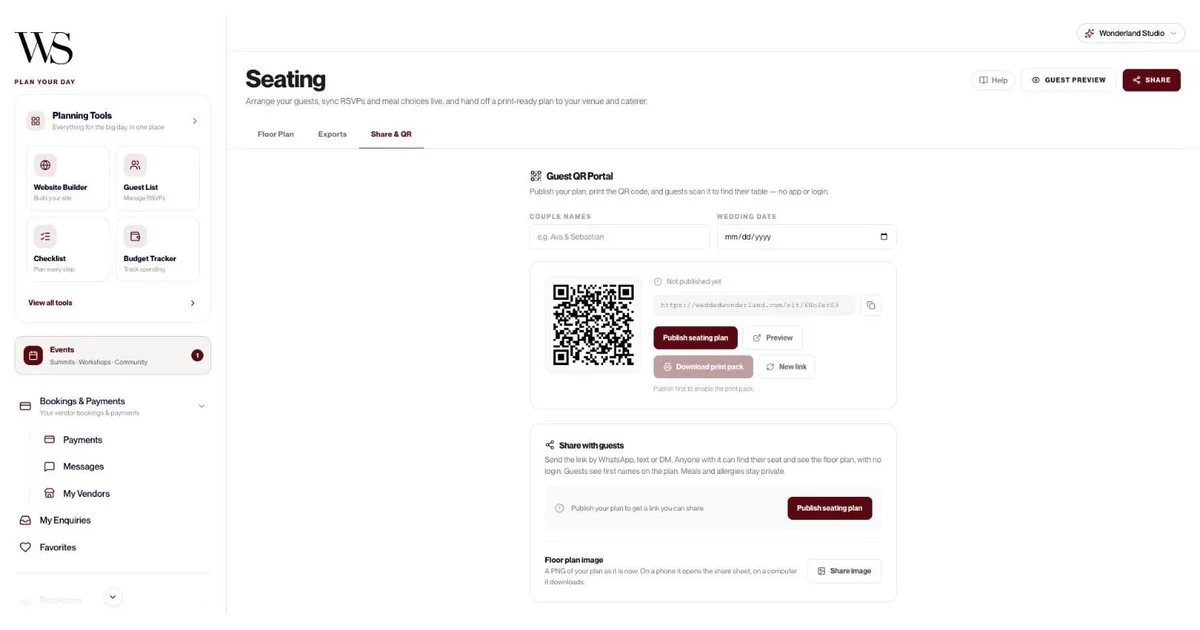
You get four exports: a Full Layout PDF for your venue, a Table-by-Table PDF with meal counts and allergies for the kitchen, a Master List CSV for your planner, and Place Cards. Publish the plan and guests scan a QR code at the welcome table to find their seat, with no app or login. Guests see first names only; meals and allergies stay private. Our wedding seating chart guide covers every step.

Studio's Timeline tool is a minute-by-minute run sheet. Start from Classic Wedding (12 moments), Intimate Wedding (7) or Destination Wedding (9), or build your own. Each moment has a time, title, one of 13 categories, a duration, a location, notes and an assigned vendor. It sorts itself by time and shows the total length of the day. Add days for a welcome party or a farewell brunch.
Share it as a read-only link your photographer, DJ and coordinator can open without signing up, or print it. Our wedding day timeline guide has sample schedules.
Yes. Studio's budget works in USD, EUR, GBP, AUD and CAD, which helps if you're marrying abroad or have vendors billing in different currencies. Start from a Luxury Local Wedding or Luxury Destination Wedding template, or set your own number. Allocate by category with due dates, and the allocation bar warns you if you over-allocate. Log expenses as Paid or Due, and the overview shows Total Budget, Projected Spend, Funds Remaining and Total Invested, with a donut chart and "Allocated vs spent" bars.
The Knot's Budget Advisor is good at something different: suggesting vendors that fit your number, based on local data. If that's what you want, it's a helpful free tool.
Studio's website templates are culturally specific, each pre-filled with the ceremonies, accommodation and FAQs for that tradition:
Marigold & Gold: South Asian and Indian weddings, multi-day, with mehndi, sangeet, baraat and pheras.
Emerald & Oud: Middle Eastern and Arab weddings, with henna night, nikah and zaffe.
Double Happiness: East Asian and Chinese weddings, with a tea ceremony and banquet.
Heritage & Bloom: African and Afro-Caribbean weddings, with a traditional ceremony, white wedding and jumping the broom.
Coastal Editorial: Mediterranean and European weddings, with a church ceremony and long lunch.
Modern Classic: a Western wedding, or start from a blank canvas.
Everything stays editable, from content and colors to layout. The RSVP form handles meal choices, up to five named plus-ones and per-event RSVPs, so guests can say yes to the sangeet and the reception separately. A deadline closes the form automatically.

The planning tools The Knot and WeddingWire publish center on the checklist, budget, guests, website, vendors and registry (plus WeddingWire's seating chart). Studio adds three more:
Menu: dishes by course, from the first course to the wedding cake, sweets table, open bar, late-night food and kids menu, with eight dietary tags (vegetarian, vegan, gluten-free, dairy-free, nut-free, halal, kosher, pescatarian), allergens, alternatives, and wine or cocktail pairings. A dietary-coverage bar shows whether everyone is covered. See our wedding menu guide.
Decor list: costed by zone, with eight zones in the starter, quantities, estimated and actual costs, and a status of To confirm, Confirmed or Booked.
Moodboards: up to 20 boards with images, color palettes, links, notes, venues and vendors, shareable as view-only links.

Yes. The 12-question destination quiz returns a ranked shortlist of destinations, and Recommendations show "Your wedding edit" of venues and vendors in each country. The AI Planning Assistant shows real Wedded Wonderland venue cards inline: ask about a wedding in Italy for 100 guests and it can show venues like Villa d'Este, Villa San Michele and Villa Balbiano. Destination Wedding templates cover the checklist (13 tasks) and run sheet (9 moments), and guest records hold travel country, arrival and leaving times, and accommodation notes. Browse our destinations for ideas.
Yes. Inside the Budget tool you can book an Advisory Session with a Wedded Wonderland expert for $258.75, all fees included. For full-service planning, there's Wonderland Concierge.
Here's where the two Knot Worldwide sites are the better pick:
Price: both describe their planning tools as free. Studio is a 7-day free trial, then a paid subscription.
Vendor reach: WeddingWire lists over 158,000 local professionals, and The Knot Worldwide counts around 900,000 professionals across its platforms.
Reviews: WeddingWire has over 3 million vendor reviews, and The Knot's reviews can't be edited or removed by vendors.
Registries: both offer registries, and The Knot's combines gifts and cash funds in one list. Studio doesn't offer a registry or cash fund.
Guest App: WeddingWire adds a separate Guest App for guests. Studio's own app, Wedded Pro, is for the couple, and guests use your website and QR codes in any browser.
Vendor messaging: WeddingWire's vendor manager lets you message vendors directly from your planning tools.
If you're only choosing between the two sister sites:
Pick The Knot if: the registry and wedding website matter most, or you like the idea of a Budget Advisor suggesting vendors in your price range.
Pick WeddingWire if: you want a free drag-and-drop seating chart in the same toolkit, a separate Guest App, and fast vendor messaging.
Because they share a parent company, you'll find many of the same vendors on both. It's sensible to pick one for planning rather than splitting your guest list across two accounts.
Wonderland Studio, best all-in-one planner: eleven connected tools, the deepest seating planner here, a run sheet, menu planner, costed decor, culturally specific websites, five budget currencies and destination planning.
The Knot, best for registry and website: a free app, registry with cash funds, website, guest list and Budget Advisor, plus one of the biggest vendor marketplaces in the US.
WeddingWire, best free toolkit with a seating chart: free checklist, budget, guest list, seating chart, website and vendor manager, with over 158,000 local professionals and over 3 million reviews.
Tool | What you get |
|---|---|
Website | Six culturally specific templates plus blank canvas; edit content, colors and layout; reorder or hide sections; upload photos; Draft/Live toggle; preview; public link |
RSVP form | Meal choices, up to 5 named +1 slots, per-event RSVPs, a deadline that closes the form automatically, CSV export with meals and plus-ones |
Website dashboard | Confirmed, pending and declined counts, plus page views |
Guests | Add one by one, import a CSV, invite by email, public self-registration link, invite cards, "Save & send invite" or "Save without inviting" |
Guest details | Category, party size 1 to 10, meal, dietary restrictions, plus-one, city and country traveling from, arrival and leaving times, accommodation notes |
Guest tracking | Total Guests, Confirmed, Invited, Declined; search and filters; Timeline of Responses; CSV export |
Seating templates | Small, Medium or Grand; Classic Rounds, Long Banquet or Horseshoe; eight venue areas |
Seating builder | Draw venue boundaries, tables of any shape, resizable zones, collision detection, grid, zoom, pan, undo and redo |
Seating helpers | Seat group together, Fill remaining seats, Balance table sizes, Suggest for unseated |
Seating exports | Full Layout PDF, Table-by-Table PDF with meals and allergies, Master List CSV, Place Cards PDF |
Seating QR | Guest QR Portal, print pack, share by WhatsApp, text or DM, Share image, Guest Preview |
Budget | Local or destination templates; USD, EUR, GBP, AUD, CAD; allocations with due dates; over-allocation warning; category insights |
Budget tracking | Expenses as Paid or Due; Total Budget, Projected Spend, Funds Remaining, Total Invested; donut chart; allocated vs spent bars; transaction table |
Run sheet | Classic (12), Intimate (7) or Destination (9) templates; multiple days; 13 categories; durations; assigned vendor; share link; print |
Checklist | Classic (15), Intimate (10) or Destination (13) templates; priority; status; 9 categories; due dates; linked vendors; notes up to 2,000 characters |
Vendors | Auto-fill from a Wedded Wonderland listing; 14 categories; contract status and link; deposit and balance due; 1 to 5 star ratings; suggested vendors with average costs |
Calendar | Month, Week and Year views; appointments with email reminders; task deadlines and run sheet moments pulled in; 30-day upcoming feed |
AI Planning Assistant | Venue, vendor, timeline, budget and guest chat; real venue cards inline; Recommended for You panel; export chat; Cmd/Ctrl+K |
Menu | Dishes by course or custom course; 8 dietary tags; allergens; alternatives; drink pairings; dietary-coverage bar; CSV import |
Decor list | Costed by zone; quantities; estimated and actual cost; status; running totals; six currencies including AED |
Moodboards | Up to 20 boards of 100 pieces; images, palettes, links, notes, venues, vendors; view-only share links; print or PDF |
Marketplace | Your wedding edit by country, 12-question destination quiz, Favorites, My Enquiries, Messages, Bookings & Payments with receipts, My Vendors |
Get Featured | Free editorial submission to the Wedded Wonderland editors through Get Featured |
Human help | Advisory Session inside the Budget tool at $258.75, all fees included; full service through Wonderland Concierge |

No registry or cash fund: Use The Knot, WeddingWire or another registry and link it from your Studio website.
One login per wedding: There's no separate partner login. "Assigned to" on tasks is a label, not a second account.
One budget and one menu per account: You can't run two versions side by side to compare scenarios.
The menu has no export yet: Caterer table sheets come from the seating exports instead.
AI memory is session-only: The assistant remembers your details within a chat, not between visits.
No published subscription price: You get 7 days free with full access first.
Yes, and plenty of couples will. Use The Knot or WeddingWire to search vendors, read reviews and set up your registry. Then run the planning in Studio, where your website, guest list, seating, budget, run sheet, menu and decor share the same information.
The difference shows up in the last six weeks. The RSVPs are in, the caterer wants meal counts by table, the venue wants a floor plan, the DJ wants a run sheet and the florist wants the moodboard. In Studio, that's four seating exports and two share links. Our step-by-step guide on how to plan a wedding shows how it fits together, and our wedding planning tools page walks through every tool.
Written by

Content and Creative Manager
Joseph Joshua is the SEO & Content Manager at Wedded Wonderland, bringing an editorial and search strategy perspective to the publication’s coverage of luxury weddings, destination celebrations and bridal lifestyle. His approach to content centres on helping readers move from inspiration to informed decisions, with attention to the design, craftsmanship and personal details that give a celebration its character.
Search real weddings, venues and vendors from around the world.
Search Wedded Wonderland