You have a Pinterest board with 900 Pins. It has three different color schemes, a barn, a ballroom, a beach, and at least forty photos of the same pampas grass arch. It's beautiful. But it isn't a mood board, and it's not a plan.
That's the gap this guide is about. Pinterest is where wedding style begins, and for good reason. But at some point you have to choose one look, show it to your florist, and find out what it costs. This guide compares Pinterest and Canva with the Decor & Moodboard tool inside Wonderland Studio, the wedding planning suite from Wedded Wonderland. We'll be clear about what each does best, because the right answer for most couples is to use more than one.
Wonderland Studio is made by Wedded Wonderland, the publisher of this guide. We've compared it as fairly as we can, using each company's own published information, checked when this guide was last updated.
Pinterest is for collecting. A wedding mood board tool is for deciding.
Pinterest calls itself a visual discovery engine. You search, scroll and save, and its feed keeps showing you more of what you like. That's exactly what you want in the first few months, when you don't yet know whether you're a candlelit-ballroom couple or a long-lunch-in-a-vineyard couple.
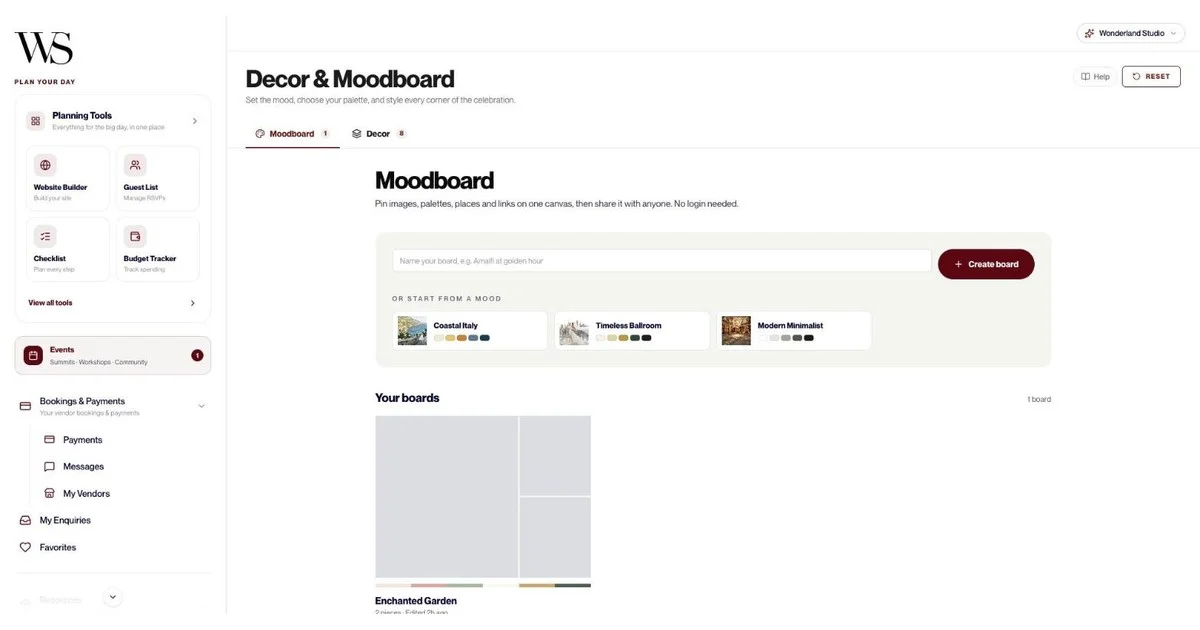
A wedding mood board tool works the other way round. It narrows. You pick the twenty images that really capture your day, set a color palette, add the venue you've chosen, and share one clear mood board with the people who need to see it. Wonderland Studio goes one step further and adds a decor list costed by zone, so the board turns into numbers: what you need for the ceremony aisle, the guest tables and the lighting, how many of each, and what it will cost.

Here's the side-by-side, based on each company's published information, checked when this guide was last updated.
Feature | Wonderland Studio Decor & Moodboard | Canva | |
|---|---|---|---|
Best for | Deciding on a look and costing it | Discovering ideas | Designing a polished, printable board |
Cost | Included in a 7-day free trial, then a paid subscription | Sign up with email and birthdate; ads shown | Free mood board maker and free download; some templates marked Pro |
Discovery feed of ideas | You bring the ideas | Yes, its core strength, plus Lens visual search on mobile | Stock photos and templates |
Free-form canvas | Yes | Boards of Pins with sections | Yes, drag and drop |
Color palettes | Yes, 2 to 8 colors per palette | Not checked | You design them |
Add links | Yes, with auto preview; paste a whole list of links | Save Pins from the web | Not checked |
Real venues and vendors on the board | Yes, from your Wedded Wonderland favorites; map links become venue pins | Not checked | Not checked |
Start from a ready-made mood | Coastal Italy, Timeless Ballroom, Modern Minimalist, Enchanted Garden | Search any style | Mood board templates |
Collaborators who edit | One login per wedding | Group boards with collaborator permissions | Invite others to edit and comment in real time |
View-only sharing without a login | Yes, by link, WhatsApp, Messages or email; turn off any time | Secret boards for privacy | Share by email or to social media from Canva |
Decor list costed by zone | Yes, 8 starter zones with estimated and actual cost | Keep costs in a separate list | Keep costs in a separate list |
Decor currencies | USD, EUR, GBP, AUD, CAD, AED | Not applicable | Not applicable |
Print or PDF | Boards and decor list | Not checked | Download your design |
Limits | 20 boards, 100 pieces each, images up to 5 MB | Not checked | Not checked |
A costed decor list is a planning feature rather than a design one. Pinterest and Canva are inspiration and design tools, and they're excellent at it.
Because a wedding mood board isn't a piece of art for its own sake. It's a brief for your florist, your stylist, your venue and your partner, and it has to turn into a budget. Here's what Studio does that matters for that:
One board, every kind of idea: six piece types sit on a free canvas: images (up to 5 MB), color palettes of 2 to 8 colors, links with an automatic preview, notes, venues and destinations, and vendors from your favorites.
Real venues and vendors on the board: venues and vendors you've favorited on Wedded Wonderland can be pinned straight to a mood board, so the board shows the actual place and the actual florist, not just a photo you found.
Map links become venue pins: paste a map link and it turns into a venue pin on your board.
Paste a list of links: drop in a batch of links in one go rather than adding them one at a time.
Start from a mood: pick Coastal Italy, Timeless Ballroom or Modern Minimalist (curated starters include Enchanted Garden) and edit from there.
Room to explore: up to 20 mood boards with 100 pieces each, so you can keep a board per event, per zone or per "maybe".
Share without a login: send any mood board as a view-only link, by WhatsApp, Messages or email. Your mom, your florist and your venue coordinator can open it with no account. Turn sharing off any time.
A decor list costed by zone: the step most inspiration tools leave to you (more on this below).
Print or PDF: print your boards and decor list, or save them as PDFs for a vendor meeting.
This is the feature that makes Studio's mood board different, so it's worth explaining properly.
Once you know your look, you need to know what it takes to build it. That means a list: how many centerpieces, how many feet of aisle runner, how many candles, and what each one costs. Most couples end up doing this in a spreadsheet or a florist's quote they can't edit.
Studio's decor list organizes every item by zone. The starter list comes with 8 zones:
Cake & dessert table: think stands, linens, signage and florals.
Ceremony aisle: think runners, aisle markers, petals and chairs.
Ceremony altar/arch: the arch or backdrop and its flowers.
Couple's table: the sweetheart or head table styling.
Guest tables: think centerpieces, linens, candles, place settings.
Lighting & ambience: think candles, string lights, uplighting.
Reception hall: the bigger pieces that set the room.
Welcome bags/favors: gifts for guests.
For each item you set a quantity, an estimated cost and an actual cost, and a status: To confirm, Confirmed or Booked. You can filter by zone or status, and running totals show where the money is going. Prices can be set in USD, EUR, GBP, AUD, CAD or AED, which helps with destination weddings where your stylist quotes in a different currency from your budget.

The practical win is simple. When your florist sends a quote, you can see straight away whether the guest tables zone is over your estimate, and decide whether to trade the candles for string lights before you sign.
Discovery. Nothing else comes close, and we wouldn't tell you to stop using it.
Scale: Pinterest reports 640 million monthly active users worldwide, which means an enormous library of real weddings, styling ideas and DIY projects.
Boards and sections: boards are collections for your Pins, and sections let you split one wedding board into "Ceremony", "Florals" and "Tablescapes".
Secret boards: keep your wedding board private with a toggle, which is handy if you don't want guests seeing the dress.
Group boards: invite your partner, your maid of honor or your planner as collaborators, and choose what they can do, from saving and commenting to almost everything.
Lens visual search: on mobile, tap the camera icon next to the search bar to find ideas inspired by a photo or something in front of you, like a table setting at a friend's wedding.
Shopping: you can search for products to buy, and product Pins open the retailer's site.
Where it gets harder: Pinterest keeps showing you more, which is wonderful for inspiration and tricky for decisions. A board of hundreds of Pins doesn't tell your florist which look you chose, and adding up what the look costs is a separate job. That's the job of a mood board.
Canva is the design-minded middle ground. Its free mood board maker gives you templates and a drag-and-drop editor, and you can upload your own photos or choose from its stock library. You can invite others to your design so they can add input and comment in real time, on desktop, laptop, iPhone or iPad. When you're done, you can download the board for free, or share it to social media or by email straight from Canva. For a looser brainstorm, Canva's free online whiteboard includes a "Mood Board Brainstorm" template. Some templates carry a Pro badge, so check before you choose one.
Canva is the best of the three for a mood board that looks like a magazine page. If you want a polished, printable style brief for your stylist, or a board to post for friends, it's excellent.
Where it gets harder: a Canva mood board is a design, separate from your venue booking and your budget, so the decor costs live somewhere else. Many couples use Canva to make the pretty version and a planning tool to run the numbers.

Decor & Moodboard is one of eleven connected tools in Wonderland Studio. These are the ones that work most closely with your style decisions, feature by feature:
Vendors: 14 service categories including Florist, Rentals, Stationery and Cake/Desserts. Track contract status, contract link, total cost, deposit paid and an auto-calculated balance due. "Find a Wedded Wonderland vendor" auto-fills details from a marketplace listing, and suggested vendors by category show an average cost.
Budget: allocate by category with due dates, get a warning if you over-allocate, and see Total Budget, Projected Spend and Funds Remaining at a glance, in USD, EUR, GBP, AUD or CAD.
Website: six culturally specific templates, Marigold & Gold, Emerald & Oud, Double Happiness, Coastal Editorial, Heritage & Bloom and Modern Classic, or a blank canvas. Colors, content and layout are all editable, so your palette can carry through to your wedding website.
Tasks: a Decorations category for checklist items such as "confirm florist mockup", with due dates that appear on your calendar.
Timeline: assign your florist or stylist to setup moments on the run sheet, so everyone knows when the arch goes up.
Seating: the floor plan shows where every table sits, which helps when you're counting centerpieces for the guest tables zone. See our wedding seating chart guide.
Menu: your dessert table and cake belong to both the decor list and the menu. Read more in our wedding menu guide.
Marketplace: favorite venues and vendors on Wedded Wonderland, then pin them to your boards. If you haven't chosen a place yet, our destinations guides and the 12-question destination quiz help you shortlist.
AI Planning Assistant: ask about venues and vendors and see real Wedded Wonderland listings inline as you chat.

Here's where we'd point you elsewhere, honestly:
Finding ideas: Pinterest's feed, search and Lens are built for discovery. Studio's mood board is built for curating what you've already found.
Design polish: Canva's templates and stock library make it easier to produce a board that looks professionally designed.
Group editing: Pinterest group boards and Canva both let several people edit. Studio has one login per wedding, so collaborators view boards through share links rather than editing them.
Cost: Canva's mood board maker and download are free. Studio is a 7-day free trial, then a paid subscription.
Visual search: Pinterest's mobile app has Lens, which finds similar ideas from a photo. Studio doesn't do visual search.
Board limits: Studio allows 20 boards with 100 pieces each and images up to 5 MB. That's plenty for most weddings, but it's a limit worth knowing if you like to save everything.
This is the workflow we recommend, using each tool for what it does best.
Save everything for a few weeks. Use sections for ceremony, reception, florals, attire and stationery, and keep the board secret if you'd rather guests didn't see it. Don't edit yet.
Scroll back through your board and notice what repeats. Is it candlelight? Greenery with white flowers? Terracotta and olive? Those repeats are your style. Write them down in three or four words.
Start from the mood closest to yours (Coastal Italy, Timeless Ballroom, Modern Minimalist or Enchanted Garden), then replace the starter pieces with your own. Upload your 15 to 25 strongest images, set a palette of 2 to 8 colors, paste links to the pieces you love, and pin your venue and favorite vendors. If you'd like a magazine-style version too, lay out the same picks in Canva.
Send the mood board's view-only link to your partner, your parents and your florist by WhatsApp, Messages or email. Nobody needs an account. When the conversation is done, turn sharing off.
Go zone by zone through the 8 starter zones, add every item with a quantity and an estimated cost, and mark each one To confirm. As quotes come in, add the actual cost and move items to Confirmed, then Booked. Watch the running totals and adjust before you sign.
Print the mood board and decor list, or save them as PDFs, and bring them to your florist and stylist meetings. It's the clearest brief you can give.
Whatever tool you use, a useful wedding mood board covers these:
A color palette: three to five main colors, plus a neutral and a metallic if you use one.
The venue: a photo of the actual space, because the room changes everything.
Florals: the shapes, flowers and density you like, and a few you don't.
Tablescapes: linens, centerpieces, candles, place settings.
Ceremony styling: the arch or backdrop and the aisle.
Lighting: candles, string lights, uplighting, or daylight only.
Stationery: invitations, signage and menus in the same style.
Attire notes: colors for the wedding party so photos look cohesive.
Texture and mood words: three or four words that sum up the feel.
Keep it focused. Twenty strong images say more than two hundred.
If you... | Choose |
|---|---|
Are just starting and need ideas | |
Want a polished, magazine-style board to print or post | Canva |
Need one board that shows your real venue and vendors | Wonderland Studio |
Want to share a board with vendors and family with no login | Wonderland Studio |
Need to know what your decor will cost, zone by zone | Wonderland Studio |
Are planning a destination wedding with decor quoted in AED or EUR | Wonderland Studio |
Want several people editing the same board | Pinterest group boards or Canva |
Our recommendation: keep Pinterest for discovery, use Canva if you want a beautiful printable mood board, and use Wonderland Studio's Decor & Moodboard to decide, share and cost the look, right next to your budget and vendors. For the bigger picture, see our guide on how to plan a wedding, or explore every tool in our wedding planning tools guide.
Written by

Content and Creative Manager
Joseph Joshua is the SEO & Content Manager at Wedded Wonderland, bringing an editorial and search strategy perspective to the publication’s coverage of luxury weddings, destination celebrations and bridal lifestyle. His approach to content centres on helping readers move from inspiration to informed decisions, with attention to the design, craftsmanship and personal details that give a celebration its character.
Search real weddings, venues and vendors from around the world.
Search Wedded Wonderland