Joy (withjoy.com) is one of the most popular wedding website platforms in the US. It says its free website builder is loved by over 2 million couples, and it's easy to see why: the site, RSVPs, registry and app all cost nothing to start.
Wonderland Studio takes a different approach. It's a full planning suite from Wedded Wonderland with eleven connected tools: Website, Guests, Seating, Budget, Timeline, Tasks, Vendors, Calendar, an AI Planning Assistant, Menu, and Decor & Moodboard. The website is the front door, and everything a guest tells you there travels through the rest of your plan.
So which is better? It depends on what you need beyond the website. This guide compares both, tool by tool, using Joy's own website and help center and Studio's live tools.
Wonderland Studio is made by Wedded Wonderland, the publisher of this guide. We've compared it as fairly as we can, using each company's own published information, checked when this guide was last updated.
Joy is built around the guest experience: a free website, an RSVP form, a registry and a mobile app your guests can use to reply, check the schedule and share photos. Wonderland Studio is built around the couple's whole plan: the same RSVPs become a seating chart, caterer meal counts, place cards, a run sheet and a budget, all in one account.
Put simply:
Joy is best for: couples who want a free website, an app and a registry together, and who will plan the rest elsewhere.
Wonderland Studio is best for: couples who want their website connected to deep planning tools, especially for multicultural, multi-day or destination weddings.
Studio's website builder opens with six culturally specific templates, each pre-filled with the ceremonies, accommodation notes and FAQs for that tradition:
Marigold & Gold: South Asian and Indian, multi-day, with mehndi, sangeet, baraat and pheras.
Emerald & Oud: Middle Eastern and Arab, with the henna night, nikah and zaffe.
Double Happiness: East Asian and Chinese, with the tea ceremony and banquet.
Coastal Editorial: Mediterranean and European, with a church ceremony and long lunch.
Heritage & Bloom: African and Afro-Caribbean, with a traditional ceremony, white wedding and jumping the broom.
Modern Classic: Western, timeless and understated.
You can also start from a blank canvas. Every template stays fully editable: content, colors and layout, with sections you can edit, reorder or hide and your own photos.

The built-in RSVP form collects meal choices, up to five named companion (+1) slots and per-event RSVPs, and it closes itself when your RSVP deadline passes. Guests reply without creating an account. You switch the site between Draft and Live, preview it, and share one simple link. The website dashboard shows confirmed, pending and declined counts and page views, and you can export every RSVP, with meals and plus-ones, as a CSV.
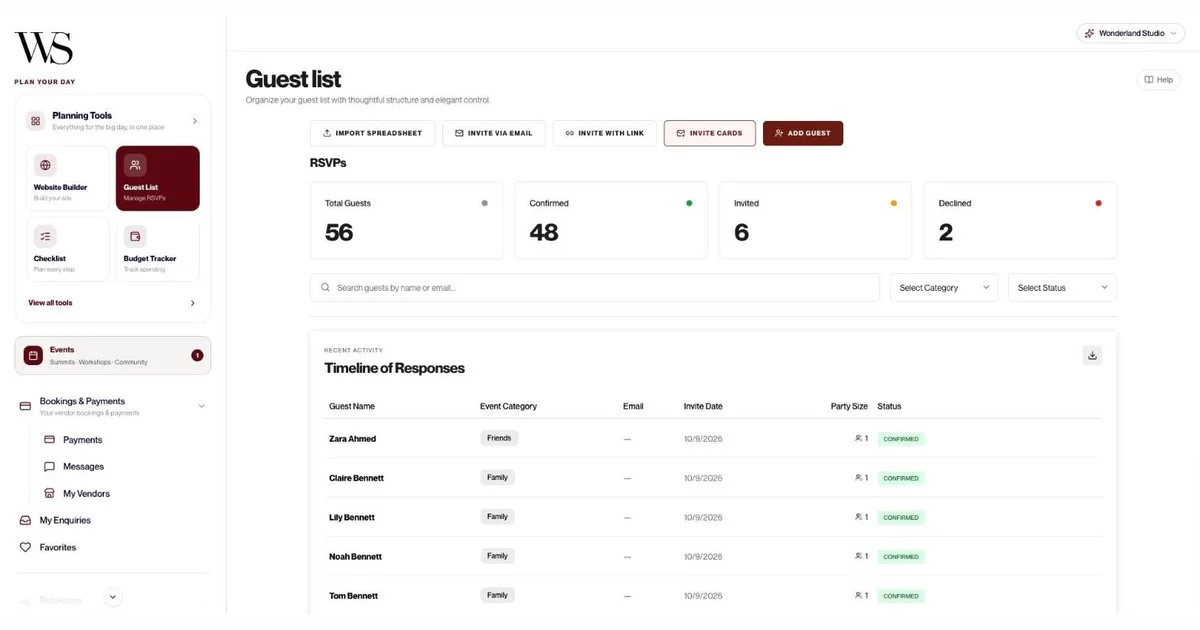
Those replies don't stop at a spreadsheet. In our sample wedding, 56 guests were invited, 48 confirmed and 2 declined. The guest list updated itself, and the seating planner then offered exactly those 48 confirmed guests to seat.
Studio's seating planner starts from a template (up to 75, 75 to 150, or 150 to 300 guests, in Classic Rounds, Long Banquet or Horseshoe layouts) or a room you draw yourself. Four helpers do the slow work: Seat group together, Fill remaining seats, Balance table sizes and Suggest for unseated. In our test, "Fill remaining seats" placed all 48 confirmed guests in one click.
When you're done, there are four exports: a Full Layout PDF for your venue, a Table-by-Table PDF with meal counts and allergies for the kitchen, a Master List CSV for your planner, and Place Cards. A guest QR portal lets everyone scan a code and find their table on the day, with no app or login. Guests see first names only, while meals and allergies stay private.

Studio also includes a multi-day run sheet, a checklist, a vendor tracker linked to the Wedded Wonderland marketplace, a calendar, a menu planner, a budget in five currencies, moodboards, a decor list costed by zone and an AI Planning Assistant that shows real venues and vendors. We cover each one in the feature table below.
Studio doesn't include a gift registry or cash fund. Its planning tools also come to your phone through Wedded Wonderland's companion app, Wedded Pro, on iOS and Android. There's one login per wedding, so you and your partner share it rather than having separate editor accounts. And it isn't free: you get a 7-day free trial with full access, then a paid subscription. If your trial ends, nothing is deleted; your dashboard locks until you subscribe.
Joy is genuinely generous. Its pricing page lists these at $0: a planning dashboard, the wedding website, an all-in-one registry, a mobile app, unlimited guests, online RSVP, hundreds of digital invites, multiple editor accounts and personal customer support.
Joy offers hundreds of free templates, with color and font options and even custom CSS for people who like to tinker. You can control which pages are visible and password-protect the site. Built-in sections cover your schedule, a Q&A page, wedding party bios and your love story.
The RSVP form is flexible. Default questions cover attendance, meal preferences, hotel rooms, rehearsal attendance, mailing address and relationship to the couple. You can set plus-one limits, add follow-up questions and run RSVPs for multiple events, and replies update the guest list automatically.
Joy's guest list manager imports a CSV, collects mailing addresses through a shareable Contact Collector form, and groups guests into parties so one person can reply for a household. Meal choices appear on each guest's profile, and you can export the list for vendors or as formatted addresses for your stationer. Partners, parents or a planner can collaborate without sharing a password, which is a real advantage over a single shared login.
Joy's companion app runs on iOS and Android. Guests can RSVP in the app, post photos and messages to a shared Moments page, add events to their calendar and see your travel recommendations. Joy's registry lets you put all your registries in one place, with honeymoon funds, cause-based giving and what Joy advertises as zero-fee cash funds. Save the dates and invitations can match your website, as eCards or prints.
Joy's pricing page lists optional upgrades: custom domain names, text messaging and premium designs for digital and printed stationery. Text messaging comes through Messaging Plus, a one-time purchase that unlocks text blasts, RSVP reminders and hotel reminders. Its help center says SMS delivery currently works for US and Canadian phone numbers only. Joy's website page says a custom domain typically costs $20 to $40 a year from a domain provider.
Here's every Studio tool and the features that matter most when you compare it with Joy.
Tool | What Wonderland Studio includes |
|---|---|
Website templates | Marigold & Gold, Emerald & Oud, Double Happiness, Coastal Editorial, Heritage & Bloom, Modern Classic, or blank canvas; each pre-filled with ceremonies, accommodation and FAQs |
Website editing | Content, colors and layout; edit, reorder or hide sections; upload photos; Draft/Live toggle; preview; slug-based public link |
RSVP form | Meal choices, up to 5 named companion slots, per-event RSVPs, deadline closes the form automatically, no guest account |
Website dashboard | Confirmed, pending, declined, page views, CSV export of RSVPs with meals and plus-ones |
Guests | Add one by one, CSV import, invite via email, public self-registration link, invite cards; category, party size 1 to 10, meal, dietary needs, plus-one, country travelling from, arrival and leaving times, accommodation notes; "Timeline of Responses"; CSV export |
Seating | Templates for up to 300 guests in Classic Rounds, Long Banquet or Horseshoe; or draw your room; any table shape; collision detection; only confirmed guests offered |
Seating helpers | Seat group together, Fill remaining seats, Balance table sizes, Suggest for unseated |
Seating exports | Full Layout PDF, Table-by-Table PDF with meal counts and allergies, Master List CSV, Place Cards PDF, floor plan as PNG |
Guest QR portal | Scan to find your table with no app or login; share by WhatsApp, text or DM; meals and allergies kept private |
Budget | Luxury Local or Luxury Destination templates, or your own; USD, EUR, GBP, AUD, CAD; allocation warnings; expense log; donut chart and "Allocated vs spent" bars |
Timeline | Classic (12 moments), Intimate (7) or Destination (9) templates; multiple days; 13 categories; vendor per moment; read-only Share View; Print |
Tasks | Classic (15 tasks), Intimate (10) or Destination (13) templates; priority, status, 9 categories, due dates, linked vendors, notes |
Vendors | Auto-fill from a Wedded Wonderland listing; 14 categories; contract status, total cost, deposit, balance due; suggested vendors with average costs |
Calendar | Month, Week and Year views; task deadlines and timeline events added automatically; appointments with email reminders |
AI Planning Assistant | Chat about venues, vendors, budgets and guests; shows real Wedded Wonderland venue and vendor cards; export chat |
Menu | Dishes by course; dietary tags including halal, kosher, vegan and gluten-free; allergens; wine or cocktail pairings; CSV import |
Decor & Moodboard | Up to 20 boards; view-only share links; decor list costed across 8 zones; USD, EUR, GBP, AUD, CAD, AED; print or PDF |
Marketplace | "Your wedding edit" recommendations, 12-question destination quiz, Favorites, Enquiries, Messages, Bookings & Payments |
Human help | Advisory Session ($258.75, or A$408.83 in Australia, fees included) and Wonderland Concierge |

Every Joy detail below comes from Joy's own website, pricing page or help center.
Feature | Wonderland Studio | Joy |
|---|---|---|
Price | 7-day free trial, then a paid subscription | Free ($0), with optional paid upgrades |
Website templates | 6 culture-specific templates pre-filled with ceremonies, plus a blank canvas | Hundreds of free templates, custom CSS |
RSVP meal choices | Yes | Yes |
RSVPs for multiple events | Yes | Yes |
Plus-ones | Up to 5 named companion slots | Plus-one limits |
RSVPs update the guest list | Yes | Yes |
Run sheet with share link | Yes, multi-day | Guest schedule on the website |
Gift registry and cash funds | No | Yes |
Invitations | Invite cards and email invites from the guest list | Matching save the dates and invitations, eCards or prints |
Messaging guests | Email invites; share seating and moodboard links by WhatsApp or text | Email announcements; text messages as a paid add-on (US and Canada numbers) |
Mobile app | iOS and Android (Wedded Pro app) | iOS and Android |
Separate logins for partners or family | No, one login per wedding | Yes, multiple editor accounts |
Guests need an account | No | No |
Wonderland Studio's seating planner, menu planner, budget, costed decor list and marketplace are covered in the feature table above. If any of those matter to you, check Joy's current feature list to see what it offers alongside its website.
Wonderland Studio. Joy handles multiple events well, and you can certainly build a multi-day schedule there. But Studio starts you off with the structure already written. Choose Marigold & Gold and your site opens with mehndi, sangeet, baraat and pheras. Choose Emerald & Oud and you get the henna night, nikah and zaffe. Double Happiness includes the tea ceremony and banquet, and Heritage & Bloom covers a traditional ceremony, a white wedding and jumping the broom.
The rest of the suite follows through. The timeline has "Add Day" for every day of the celebration, each with its own moments, vendors and locations. The menu planner tags dishes halal, kosher, vegetarian, vegan, gluten-free, dairy-free, nut-free or pescatarian. Guest profiles record the country each guest is travelling from, their arrival and leaving times and accommodation notes. The budget runs in USD, EUR, GBP, AUD or CAD, and the decor list adds AED.

Joy. If your budget for planning tools is zero, Joy's free website, RSVPs, registry and app are hard to beat, and plenty of couples pair a free site with their own spreadsheets for the rest. Wonderland Studio offers a 7-day free trial with full access, then a paid subscription, so it suits couples who would rather pay once for a connected planner than stitch free tools together.
Both make life easy for guests. Neither requires guests to create an account to RSVP. Joy gives guests a dedicated app on iOS and Android, where they can reply, see the schedule, add events to their calendar and share photos. Studio keeps everything in the browser: the website, RSVP form, timeline share link, moodboard links and seating QR code all open on any phone with nothing to install, which can be simpler for older relatives and guests travelling from abroad.
Wonderland Studio. Its budget tool starts from a Luxury Local Wedding or Luxury Destination Wedding template, or your own total, and warns you if you over-allocate. You log expenses as Paid or Due and see Total Budget, Projected Spend, Funds Remaining and Total Invested. The vendor tracker calculates each balance due, and the decor list costs every item by zone. In our sample, eight decor items came to $7,150 estimated.
If you'd like a second opinion, you can book an Advisory Session with a Wedded Wonderland expert right inside the Budget tool, at $258.75, or A$408.83 in Australia, with all fees included.

Couples often weigh Joy against Zola, so here's the short version from both companies' own sites. Both let you build and publish a wedding website free, with a registry and online RSVPs. Zola says it offers over 600 templates and sells custom domains from $17.99. Joy offers hundreds of free templates, custom CSS, multiple editor accounts and an app on iOS and Android, while Zola shows an iOS app. Pick Zola if matching paper and a big registry come first. Pick Joy if a guest app and collaboration matter more. And if you want the website joined to seating, a run sheet, a menu and a budget, that's where Wonderland Studio comes in.
Yes, and some couples do. You might keep a Joy registry and link it from your Studio website, then use Studio for RSVPs, seating, the run sheet and everything else. Just pick one place for RSVPs. If guests reply in two places, your counts will drift, and your seating chart is only as good as the list behind it.
Choose Joy if you want a free wedding website, a guest app on iOS and Android, a registry with cash funds and matching stationery, and you're happy to manage seating, budget and the day-of plan elsewhere.
Choose Wonderland Studio if you want one connected planner: a website that starts with your traditions, RSVPs that flow into your guest list and seating plan, four seating exports and a guest QR portal, a multi-day run sheet, a menu with dietary tags, a multi-currency budget, a costed decor list and access to the Wedded Wonderland marketplace and concierge.
To see how each tool works in practice, read our guides to the wedding seating chart, the wedding day timeline and the wedding planning checklist, or browse every tool in wedding planning tools.
Written by

Content and Creative Manager
Joseph Joshua is the SEO & Content Manager at Wedded Wonderland, bringing an editorial and search strategy perspective to the publication’s coverage of luxury weddings, destination celebrations and bridal lifestyle. His approach to content centres on helping readers move from inspiration to informed decisions, with attention to the design, craftsmanship and personal details that give a celebration its character.
Search real weddings, venues and vendors from around the world.
Search Wedded Wonderland