If you plan weddings for a living, you've probably used Aisle Planner, trialed it, or had a colleague swear by it. Aisle Planner is one of the best known software platforms built for wedding and event professionals, and for good reason.
Wonderland Studio's Planner Portal is newer than Aisle Planner, and it comes at the job from the other direction. Wonderland Studio started as the planning suite couples use to run their own weddings. The Planner Portal puts that whole suite in a planner's hands, with a separate workspace for every couple you manage.
This guide compares Aisle Planner and the Planner Portal honestly, for working planners. We'll cover what each one is built to do, where each one wins, what they cost, and the one limit in the Planner Portal you should know about before you move clients over.
Wonderland Studio is made by Wedded Wonderland, the publisher of this guide. We've compared it as fairly as we can, using each company's own published information, checked when this guide was last updated.
The Planner Portal is the professional side of Wonderland Studio. You keep a roster of couples, and each couple is a fully separate workspace with all 11 Studio tools: Website, Guests, Seating, Budget, Timeline, Tasks, Vendors, Calendar, the AI Planning Assistant, Menu, and Decor & Moodboard.
When you open a couple, an amber "Managing: <couple>" bar sits at the top of the screen, so you always know whose wedding you're editing. That context expires after 12 hours, which stops you from accidentally editing the wrong wedding the next morning.
Here's what the portal adds on top of the tools:
A live dashboard: couples are sorted into Onboarding, Planning and Finalizing buckets based on their real tasks and RSVPs, not a status you remember to update.
Average completion: see how far along your whole roster is at a glance.
Closest Wedding and Upcoming: the next wedding on your books and what's coming after it.
Google Calendar export: one click per couple adds the wedding to Google Calendar (a one-way export).
Archive without deleting: archive a couple after the wedding to free a slot, and their data stays intact.
Plans by roster size: Starter covers 5 active couples, Pro covers 20, and Agency is unlimited.

Aisle Planner is software for wedding and event professionals, now marketed as Aisle Planner Pro. Its homepage says more than 8,000 event professionals use it each month.
Aisle Planner covers two big jobs: running the business and planning the event.
Business tools: lead management, contacts and e-signatures, proposals and interactive quotes, invoicing and online payments, and external calendar syncing are included in every plan.
Planning tools: a client portal, timelines, checklists, budgets, guest management and messaging, and layouts and seating come with the project-based plans (15 projects and up).
Client portal: in Aisle Planner, clients accept an invitation and create an account on your branded company login page. They land on their own event dashboard and see only the tools and tasks you've released to them.
Layouts and seating: start from a blank canvas or a template, upload a venue floor plan and set its scale, drag in objects from a library, build several layouts per event, and download a PDF with names, seat numbers and meal indicators.
Unlimited users: every Aisle Planner plan includes unlimited users, which suits teams.
Here's the side-by-side. "Not found" means we couldn't find the feature on Aisle Planner's own pages, not that it definitely doesn't exist.
Feature | Wonderland Studio Planner Portal | Aisle Planner |
|---|---|---|
Built for | Planners running each couple's full wedding plan | Wedding and event professionals running business and events |
Separate workspace per client | Yes, every couple is fully separate | Yes, per wedding or project |
Planning tools per client | All 11 connected tools | Timelines, checklists, budgets, guests, layouts and seating (15-project plans and up) |
Roster dashboard | Onboarding, Planning, Finalizing buckets from real tasks and RSVPs | Not found as stage buckets |
Client login | Not in v1: couples see public pages only | Yes, branded client portal |
Guest RSVP website | Yes, with culturally specific templates | Not found as a guest website |
Seating | Templates, 4 auto-seating helpers, caterer and place card exports, guest QR portal | Layout canvas, floor plan upload, object library, drag-and-drop seating, PDF |
Run sheet | Multi-day timeline, 13 categories, vendor per moment, share link | Timelines |
Menu planner | Yes, courses, dietary tags, allergens, pairings | Not found |
Costed decor list | Yes, by zone, 6 currencies | Not found as a costed decor list |
Budget currencies | USD, EUR, GBP, AUD, CAD | Not found |
AI assistant with real venue listings | Yes | Not found |
CRM and lead management | No | Yes |
Proposals and e-signatures | No | Yes |
Client invoicing and payments | No | Yes |
Calendar | Google Calendar export per couple (one-way) | External calendar syncing |
Team users | Not stated | Unlimited users on every plan |
Plan sizes | Starter 5, Pro 20, Agency unlimited active couples | Up to 15, 16 to 25, 26 to 50, 51 to 100 projects |
Published price | No | Yes, from $69.99 a month for project plans |
Archive old clients | Yes, frees a slot without deleting data | Not found |
The shape of the comparison is simple. Aisle Planner wins on running the business and on letting clients log in. The Planner Portal wins on planning depth per couple, and on how much of that work the tools do for you.
Most planner software, Aisle Planner included, gives you a set of project tools. The Planner Portal gives each couple a full wedding planning suite where the tools talk to each other. RSVPs on the couple's website update their guest list, with status, meal choice and plus-ones. The seating planner offers only confirmed guests. Seating exports carry meal counts and allergies to the caterer. Task due dates and timeline events land on the calendar. Vendors added once can be linked to tasks and assigned to timeline moments.
For a planner, that means fewer spreadsheets passed between you, the couple and your suppliers. The data is entered once and flows to where it's needed.
Stage labels in most tools only change when someone remembers to change them. The Planner Portal sorts couples into Onboarding, Planning and Finalizing from their real tasks and RSVPs. Combined with average completion, Closest Wedding and Upcoming, it gives you a Monday-morning view of your whole book without opening each file.

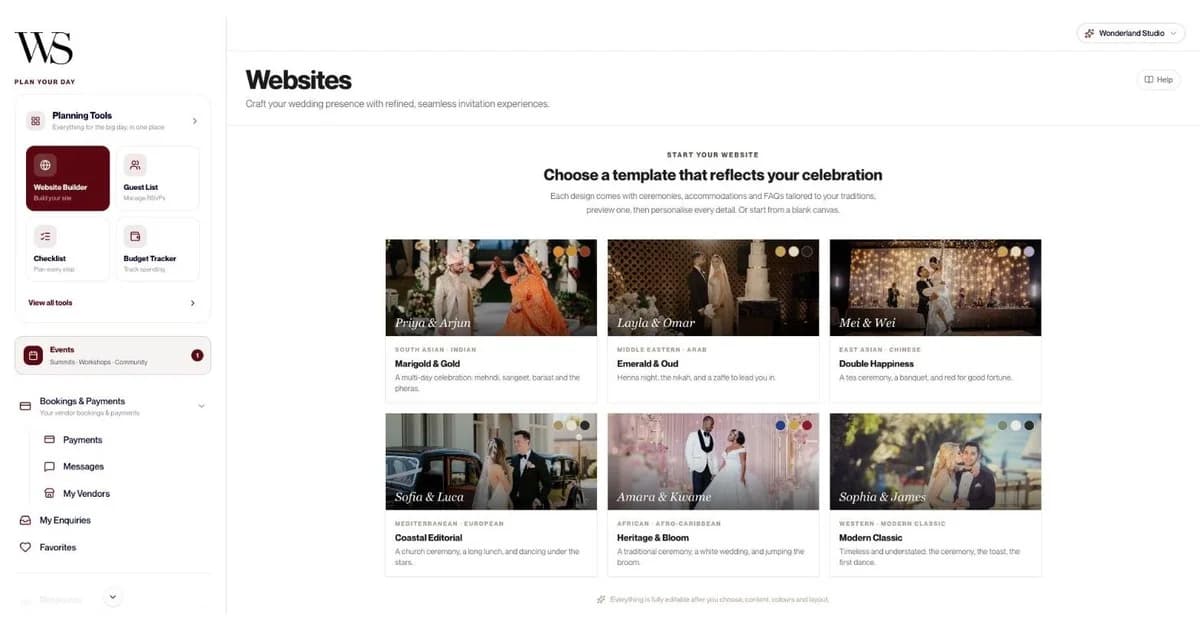
If you plan multicultural or destination weddings, Studio's website templates save real time. Each template is pre-filled with the ceremonies, accommodation and FAQs for that tradition:
Marigold & Gold: South Asian and Indian, multi-day, with mehndi, sangeet, baraat and pheras.
Emerald & Oud: Middle Eastern and Arab, with henna night, nikah and zaffe.
Double Happiness: East Asian and Chinese, with tea ceremony and banquet.
Coastal Editorial: Mediterranean and European, with church ceremony and long lunch.
Heritage & Bloom: African and Afro-Caribbean, with traditional ceremony, white wedding and jumping the broom.
Modern Classic: Western.
Everything is editable afterwards, and the built-in RSVP form handles meal choices, up to 5 named companions, per-event RSVPs and a deadline that closes the form automatically. Guests never need an account.

The Planner Portal's seating planner starts from a template (Small up to 75, Medium 75 to 150, Grand 150 to 300; Classic Rounds, Long Banquet or Horseshoe), then four helpers do the heavy lifting: Seat group together, Fill remaining seats, Balance table sizes and Suggest for unseated. In our sample wedding, "Fill remaining seats" placed 48 of 48 confirmed guests in one click.
Then it hands each supplier the version they need: a Full Layout PDF for the venue, a Table-by-Table PDF with meal counts and allergies for the caterer, a Master List CSV, and Place Cards. Guests scan a QR code to find their table, with no app or login.

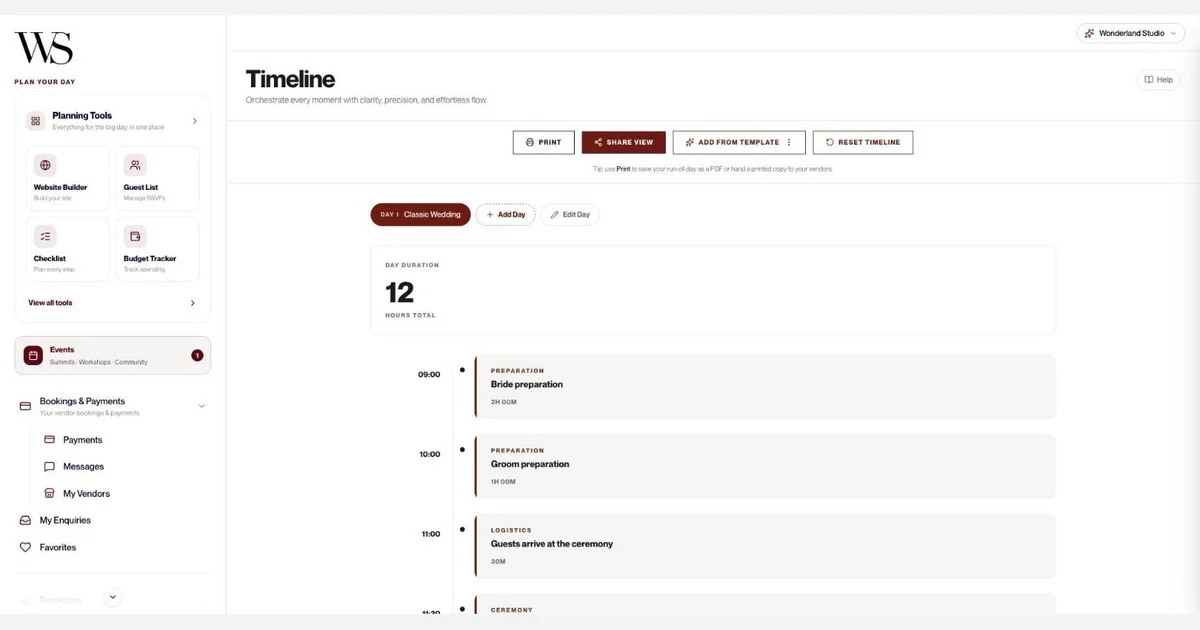
The Timeline tool is a proper run sheet. Start from Classic Wedding (12 moments), Intimate Wedding (7) or Destination Wedding (9), or build your own. Add extra days for multi-day celebrations. Every moment has a time, duration, location, notes, one of 13 categories and an assigned vendor. It's always sorted by time, shows the total day duration, and shares as a read-only link that vendors open without an account. You can also print it.

Three tools planners usually keep in separate documents are built in:
Menu: dishes by course (including custom courses like "Aperitivo"), the event each dish belongs to, eight dietary tags including halal and kosher, allergens, alternative options and wine or cocktail pairings, with a dietary-coverage bar. Import a menu from CSV.
Decor list: costed by zone, with 8 starter zones, quantity, estimated and actual cost, and status (To confirm, Confirmed, Booked), in USD, EUR, GBP, AUD, CAD or AED.
Budget: Luxury Local Wedding and Luxury Destination Wedding templates, five currencies, allocation by category with due dates, and an over-allocation warning.
Studio sits inside the Wedded Wonderland marketplace. The Vendors tool can auto-fill a supplier from a Wedded Wonderland listing and shows suggested vendors by category with an average cost. The AI Planning Assistant shows real Wedded Wonderland venue and vendor cards inline, and a 12-question destination quiz returns a ranked shortlist. For destination planners sourcing in a new country, that's a head start.
Archive a couple after their wedding and their slot frees up, with all their data kept. You can grow from Starter (5 active couples) to Pro (20) or Agency (unlimited) as your book grows.
Aisle Planner has real advantages, and some planners will need them.
Clients can log in: Aisle Planner's branded client portal lets couples create an account, see their own dashboard of tasks, deadlines and next steps, and get in-app and email notifications. They can even reply to comments by email without logging in. You control which tools each client sees.
It runs the business side: Lead management, proposals and interactive quotes, e-signatures, invoicing and online payments are in every Aisle Planner plan. The Planner Portal doesn't do client billing.
It's built for teams: Every Aisle Planner plan includes unlimited users.
Layouts on your venue's real floor plan: In Aisle Planner, you can upload a venue floor plan as a backdrop, set the scale and build multiple layouts per event from an object library.
Transparent pricing: Aisle Planner publishes its prices, with a 30-day free trial.
This is the most important limit to understand. In v1, couples you manage in the Planner Portal can't log in to it themselves. You run their workspace.
They still see everything public-facing, and none of it needs an account:
Wedding website and RSVP form: shared with guests through its public link.
Run sheet: through the Timeline's read-only share link.
Moodboards: through view-only share links you can turn off at any time.
Seating plan: through the guest QR portal and share link once you publish it.
Exports and prints: guest lists as CSV, seating PDFs, printed timelines, and printed boards and decor lists.
That works well for full-service planners who prefer to hold the plan and present it to clients. It works less well if your process depends on couples ticking off their own tasks or editing their guest list. If that's you, Aisle Planner's client portal fits better today.
Aisle Planner (from its pricing page):
Plan | Monthly price |
|---|---|
Sales Essentials (no project management tools) | $49.99 |
Up to 15 Projects | $69.99 |
16 to 25 Projects | $109.99 |
26 to 50 Projects | $164.99 |
51 to 100 Projects | $229.99 |
Aisle Planner offers 10% off for annual billing and a free 30-day trial, and asks for a credit card when you start the trial. For more than 100 projects, it asks you to contact support.
Wonderland Studio Planner Portal: plans are sized by active couples: Starter (5), Pro (20) and Agency (unlimited). Unlike Aisle Planner's, Planner Portal prices aren't published yet, so contact the Wedded Wonderland team for current pricing. Archiving a couple frees a slot without deleting anything.
Many planners already do this with every planning tool. If you need proposals, contracts and invoicing, a business platform handles the money while the Planner Portal handles the wedding.
HoneyBook is one popular option. At the time of writing, its plans start at $29 a month billed yearly, with a client portal, invoicing and payments, proposals and contracts, and HoneyBook AI in every plan. Scheduling and automations start on its $49 Essentials plan, and it offers a 30-day free trial with no credit card required.
Aisle Planner's Sales Essentials plan ($49.99 a month) is another business-only option, covering leads, proposals, e-signatures and invoicing without project management tools.
Here's the full list of what each couple's workspace includes, so you can check it against your process.
Tool | What you get for each couple |
|---|---|
Planner dashboard | Roster, Onboarding, Planning and Finalizing buckets, average completion, Closest Wedding, Upcoming, Google Calendar export, archive |
Website | 6 culturally specific templates or blank canvas, editable sections, Draft/Live toggle, preview, public link, RSVP dashboard with page views, RSVP CSV export |
RSVP form | Meal choices, up to 5 named companions, per-event RSVPs, automatic deadline |
Guests | CSV import, email and public-link invites, invite cards, category, party size 1 to 10, meal, dietary needs, plus-one, travel city and country, arrival and leaving times, accommodation notes, response timeline, CSV export |
Seating | Templates, custom venue boundary, any table shape, collision detection, 4 seating helpers, 4 exports, guest QR portal, share image, Guest Preview |
Budget | 2 templates or custom, 5 currencies, category allocation with due dates, over-allocation warning, cost factors, expense log, donut chart, allocated vs spent |
Timeline | 3 templates, multiple days, 13 categories, duration, location, notes, vendor per moment, share link, print |
Tasks | 3 templates, priority, status, 9 categories, due date, assigned-to label, linked vendor, notes up to 2,000 characters, filters and auto-sort |
Vendors | Marketplace auto-fill, 14 categories, contract status and URL, total cost, deposit, auto-calculated balance due, rating, suggested vendors with average cost per category |
Calendar | Month, Week and Year views, deadlines from Tasks, timeline events, appointments with email reminders, 30-day upcoming feed |
AI Planning Assistant | Chat about venues, vendors, timelines and budgets, real Wedded Wonderland listings inline, "Recommended for You", export chat as .txt |
Menu | Courses including custom, event per dish, 8 dietary tags, allergens, alternatives, pairings, dietary-coverage bar, CSV import |
Decor & Moodboard | Up to 20 boards of 100 pieces, 6 piece types, mood starters, view-only share links, decor list costed by zone in 6 currencies, print or PDF |
Couples can't log in to the Planner Portal in v1.
No CRM, proposals, client contracts or invoicing.
No gift registry or cash fund.
One budget and one menu per couple, and the menu has no export yet.
Google Calendar export is one-way.
AI assistant memory lasts for the session only.
No published price.
Choose the Wonderland Studio Planner Portal if: you're a full-service or destination planner who holds the plan for your couples, you want websites, seating, run sheets, menus, decor and budgets for every couple in one connected workspace, and you'd like a dashboard that tracks stages for you. Pair it with business software if you invoice through a platform.
Choose Aisle Planner if: you need couples to log in and work alongside you, or you want CRM, proposals, e-signatures and invoicing in the same tool as your planning, with unlimited team users.
If you're not sure, map your process. If most of your weekly hours go into building plans, the Planner Portal saves the most time. If most go into chasing leads, contracts and payments, Aisle Planner does more of that work.
For more on the tools themselves, see our guide to wedding planning tools and what Wonderland Studio is. Planners who also want to be found by couples can apply to get featured by the Wedded Wonderland editors for free.
Written by

Content and Creative Manager
Joseph Joshua is the SEO & Content Manager at Wedded Wonderland, bringing an editorial and search strategy perspective to the publication’s coverage of luxury weddings, destination celebrations and bridal lifestyle. His approach to content centres on helping readers move from inspiration to informed decisions, with attention to the design, craftsmanship and personal details that give a celebration its character.
Search real weddings, venues and vendors from around the world.
Search Wedded Wonderland