If you've searched for a wedding seating chart app, you've almost certainly run into Prismm. You may know it by its old name, AllSeated. It's one of the best known names in event floor plans, and venues and planners have used it for years to lay out rooms to scale and show clients the result in 3D.
So it's natural to ask whether you need it too. This guide answers that honestly. We'll compare Prismm with the seating planner inside Wonderland Studio, the wedding planning suite from Wedded Wonderland, feature by feature. Then we'll rank the best wedding seating chart apps for couples in 2027, so you can pick the right one for your wedding, not just the most famous one.
The short version: Prismm is a design tool built for event professionals. Wonderland Studio is a planning tool built for couples. That difference decides almost everything below.
Wonderland Studio is made by Wedded Wonderland, the publisher of this guide. We've compared it as fairly as we can, using each company's own published information, checked when this guide was last updated.
Wonderland Studio is a set of 11 connected planning tools in one account: Website, Guests, Seating, Budget, Timeline, Tasks, Vendors, Calendar, an AI Planning Assistant, Menu, and Decor & Moodboard. The seating planner is one of them, and it's connected to the rest.
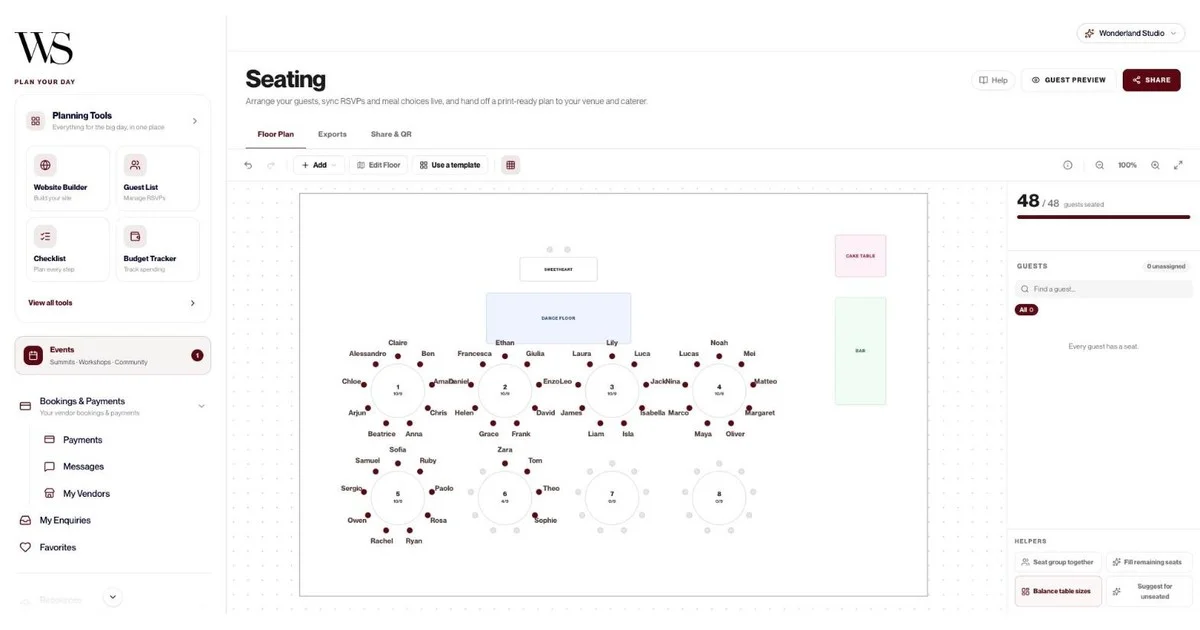
That connection is the whole point. Guests RSVP on your Studio wedding website, without creating an account. Their reply updates your guest list with their status, meal choice and plus-ones. The seating planner then offers only the guests who said yes. In our sample wedding, 56 guests were invited and 48 confirmed, so the planner showed exactly 48 people to seat.
From there, Studio does the slow parts for you:
Templates: pick a guest count (Small up to 75, Medium 75 to 150, Grand 150 to 300) and a layout (Classic Rounds, Long Banquet or Horseshoe), and the room is set up for you.
Seating helpers: Seat group together, Fill remaining seats, Balance table sizes and Suggest for unseated. In our sample, "Fill remaining seats" placed 48 of 48 guests in one click.
Exports for each supplier: a full layout for the venue, a table-by-table sheet with meal counts and allergies for the caterer, a master list CSV and place cards.
Guest QR portal: publish the plan, print the QR code, and guests scan it to find their table with no app and no login.
You can try every tool, seating included, on a 7-day free trial.

Prismm is an event design and diagramming platform. Its own customers refer to it as "Allseated (now Prismm Platform)", and the site now says Prismm is part of Cvent, the large event technology company.
Prismm's strengths are real, and they're mostly visual:
2D and 3D design: Prismm lets you design in 2D, 3D or both, and changes made in one view show up in the other.
3D walkthroughs: its 3D diagramming offers top-down and first-person views, so you can move through the room as if you were standing in it.
True to scale: Prismm says its diagrams are true to scale, with furniture and tabletop items at their real dimensions.
Big libraries: a library of over 10,000 ready-to-use 3D objects and a large library of venue floor plans.
Guest management: guest records can hold names, party sizes, contact details, RSVP statuses, meal choices and dietary requirements. You can import a guest list and assign guests to specific seats.
Collaboration: Prismm says you can collaborate with couples "and their in-laws", share layouts and seating charts, and gather real-time feedback.
Prismm's pricing starts with a free plan for one user, three events and up to 150 attendees per attendee list, with paid plans from $49 a month for more events and features. Its wedding pages invite you to book a demo or create an account.
Notice who those plans are written for: event planners, vendors and venues managing many events a year. Prismm can absolutely be used for one wedding, but it's built as a professional tool.
Here's how the two compare on what couples actually need from a seating tool. "Not found" means we couldn't find it on Prismm's own pages, not that it definitely doesn't exist.
Feature | Wonderland Studio | Prismm |
|---|---|---|
Built for | Couples planning their own wedding | Event planners, venues and vendors |
Floor plan | Top-down plan with venue boundary, grid, zoom, undo and redo | True-to-scale 2D and 3D |
3D walkthrough | No | Yes, top-down and first-person 3D views |
Layout templates | Yes: Classic Rounds, Long Banquet, Horseshoe in three guest-count sizes | Large venue floor plan and object libraries |
Seats only confirmed guests from your RSVPs | Yes, automatically from your Studio website | RSVP statuses are listed in the guest list |
RSVP website for guests | Yes, built in, no guest account needed | Not found on Prismm's pages |
One-click seating helpers | Yes: fill seats, seat groups together, balance tables, suggest tables | Place multiple guests at tables at once |
Meal choices and dietary needs | Yes, carried from RSVPs into exports | Yes, stored on guest records |
Caterer table-by-table sheet | Yes, PDF with meal counts and allergies per table | Not found on Prismm's pages |
Place cards | Yes, PDF, one per guest with table number | Not found on Prismm's pages |
Guest "find your table" QR | Yes, no app or login | Not found on Prismm's pages |
Connected budget, timeline, menu, tasks | Yes, 11 tools in one account | Not found on Prismm's pages |
Free option | 7-day free trial with full access | Free plan with limits |
Paid price published | No published price | Yes, from $49 a month |
The table makes the trade-off clear. Prismm wins on visual design: real 3D, scale and huge libraries. Studio wins on the couple's workflow: RSVPs to seats to caterer to guests, with nothing to re-type.
The most annoying part of any seating chart is keeping it in step with replies. A late decline leaves a gap. A surprise plus-one breaks a table you'd balanced. In Studio, RSVPs from your wedding website flow straight into your guest list, and the seating planner only offers people who have confirmed. You never import a list twice, and you never seat someone who hasn't replied.

Studio's seating helpers turn a blank room into a nearly finished chart. "Seat group together" keeps relatives and friend groups at one table. "Fill remaining seats" places everyone still unseated. "Balance table sizes" evens out half-empty and overfull tables. "Suggest for unseated" recommends a table for anyone left over. Then you drag a few people around to fix the politics, which is the only part a computer can't do for you.

Your venue, caterer, stationer and guests all need a different version of the same plan. Studio makes four exports, each labeled with who it's for:
Full Layout (PDF): the floor plan with table numbers, names and meal codes, for your day-of coordinator and venue.
Table-by-Table (PDF): one page per table with meal counts and allergies, for the caterer and kitchen.
Master List (CSV): every guest and field in a spreadsheet, for your planner or any vendor who wants raw data.
Place Cards (PDF): one card per guest with their table number.

Studio's Share & QR tab publishes your seating plan to a guest portal. Print the QR code on your welcome sign, and guests scan it to see their table on their own phone, with no app and no login. You can also send the link by WhatsApp, text or DM before the day. Guests see first names only, while meal choices and allergies stay private. There's a print pack after publishing, a "Share image" option that saves the floor plan as a PNG, and a Guest Preview button so you can see exactly what guests will see.

Seating is one job in a long list. In Studio, the same account holds your wedding website, budget, run sheet, checklist, vendors, calendar, menu and moodboards. Your caterer's meal counts come from the same RSVPs as your guest list. Your menu's dietary tags sit next to the allergies in your seating exports. That's the advantage of one connected suite over a stand-alone design tool.
Be clear-eyed about this. Prismm is the better choice in a few situations:
You want to see the room in 3D: If you'd like to stand at the entrance in a first-person view and see your reception before it's built, Prismm is built for exactly that. Studio's planner is a clean top-down floor plan.
Your venue or planner already uses it: Many venues and planners work in Prismm. If yours has already drawn your room to scale, it makes sense to work inside their plan.
You're designing tablescapes and decor in detail: Prismm's object library and tabletop designer go much deeper into linens, chairs, lighting and place settings than a couple's seating tool.
The exact measurements matter: A tight room, a tented reception or an unusual space benefits from a true-to-scale diagram.
If none of those apply, you're likely paying in time and learning curve for design power you won't use. And if your venue does share a Prismm plan, you can still keep your RSVPs, guest list, caterer sheets and QR portal in Studio and use their diagram for the room itself.
We looked at the seating tools couples search for most and checked each one against its company's own website. Here's our ranking for couples planning their own wedding.
Best for: couples who want their seating chart connected to their RSVPs, caterer and guests.
Studio puts the whole seating job in one flow: it seats only confirmed guests from its own RSVP website, fills tables with one-click helpers, prints a separate caterer sheet with meal counts and allergies, makes place cards, and gives guests a QR portal with no app or login. It's also part of 11 connected planning tools, including a budget in five currencies (USD, EUR, GBP, AUD, CAD), a run sheet and a menu planner. You can try it on a 7-day free trial. Trade-offs: no 3D walkthrough and no published price.
Best for: couples whose venue or planner uses it, or who want to walk through their room in 3D.
Prismm offers true-to-scale 2D and 3D design, first-person 3D views, a library of over 10,000 3D objects, and guest records with RSVP status and meal choices. It has a free plan with limits (one user, three events, up to 150 attendees per list) and paid plans from $49 a month. Trade-off: it's a professional design platform, so expect more setup than a couple's planner.
Best for: couples already running their registry and website on Zola.
Zola's seating chart pulls in confirmed guests from your Zola guest list automatically, generates a starter template from questions about your venue, supports round and rectangular tables, and lets you build separate floor plans for the ceremony, rehearsal dinner and reception. You can download it as a PDF or Excel sheet. It runs on the Zola iOS app and desktop. Zola's help center says the seating chart is free for up to 15 guests, with a Premium version to add more.
Best for: couples who already have a Joy wedding website.
Joy says its wedding website includes a built-in seating chart that syncs with your guest list. As RSVPs come in, guests are added to the list and you drag them into table assignments, with changes syncing in real time. Joy also offers guest tags so you can group people before you seat them.
Best for: couples who want a simple free tool and already use WeddingWire.
WeddingWire says its seating chart tool is totally free. It syncs with your WeddingWire guest list, supports circular or square tables, and lets you print, email or export the chart in a visual or list format. You can manage seating for all your wedding events, not only the reception.
Feature | Wonderland Studio | Prismm | Zola | Joy | WeddingWire |
|---|---|---|---|---|---|
Syncs with RSVPs or guest list | Yes, confirmed guests only | RSVP status in guest list | Yes, confirmed guests | Yes | Yes |
Layout templates | Yes, 3 layouts in 3 sizes | Venue and object libraries | Yes, generated from your answers | Not found | Not found |
One-click auto-seating helpers | Yes, 4 helpers | Bulk place guests at tables | Not found | Not found | Not found |
3D view | No | Yes | Not found | Not found | Not found |
Caterer sheet with meal counts and allergies | Yes | Not found | Not found | Not found | Not found |
Place cards | Yes | Not found | Not found | Not found | Not found |
Guest QR "find your table" | Yes, no app or login | Not found | Not found | Not found | Not found |
Export | PDF and CSV | Share layouts and seating charts | PDF or Excel | Not found | Print, email or export |
Price | 7-day free trial | Free plan, paid from $49 a month | Free up to 15 guests, then Premium | Not stated on seating page | Free |
"Not found" means we couldn't find the feature on that company's own pages. It may exist, so check before you choose.
Here's everything relevant to your seating chart, and the tools around it, in one place.
Feature | What it does |
|---|---|
Guest count templates | Small (up to 75), Medium (75 to 150), Grand (150 to 300) |
Layout templates | Classic Rounds (rounds of 10 around a central dance floor with a sweetheart table), Long Banquet, Horseshoe |
Room areas | Dance Floor, Stage, Bar, Buffet, Cake Table, Gift Table, Photo Booth, Entrance |
Build from scratch | Drag venue boundary corners, double-click an edge to add a point, grid, zoom, pan, undo and redo |
Tables | Any shape (round, square, rectangle and more), capacity adjusted with plus and minus |
Zones | Resizable areas on the floor plan |
Collision detection | Stops tables overlapping |
Seat positions | Generated automatically for each table |
Guest panel | Unseated guests, filterable by category |
Seating helpers | Seat group together, Fill remaining seats, Balance table sizes, Suggest for unseated |
Manual seating | Drag guests to any seat |
Full Layout export | PDF with table numbers, names and meal codes for the venue and coordinator |
Table-by-Table export | PDF, one page per table, meal counts and allergies for the caterer |
Master List export | CSV for planner and vendor handoff |
Place Cards export | PDF, one card per guest with table number |
Guest QR Portal | Publish, print the QR code, guests find their table with no app or login |
Share link | Send by WhatsApp, text or DM |
Privacy | Guests see first names; meals and allergies stay private |
Print pack | Available after publishing |
Share image | Saves the floor plan as a PNG |
Guest Preview | See the portal as a guest would |
Website RSVPs: meal choices, up to 5 named companion slots, per-event RSVPs and an RSVP deadline that closes the form automatically. Guests never need an account.
Culturally specific website templates: Marigold & Gold (South Asian), Emerald & Oud (Middle Eastern), Double Happiness (East Asian), Coastal Editorial (Mediterranean), Heritage & Bloom (African and Afro-Caribbean) and Modern Classic, each pre-filled for that tradition, or a blank canvas.
Guest list: add one by one, import a CSV, invite by email or a public link, and record category, party size (1 to 10), meal choice, dietary restrictions, plus-one, travel city and country, arrival and leaving times and accommodation notes.
Guest totals and filters: Total Guests, Confirmed, Invited and Declined, with search, category and status filters, a "Timeline of Responses" table and CSV export.
Menu planner: dishes by course with dietary tags (vegetarian, vegan, gluten-free, dairy-free, nut-free, halal, kosher, pescatarian), allergens and a dietary-coverage bar, so the menu matches the allergies in your seating exports.
Timeline (run sheet): a Classic Wedding template with 12 moments, multiple days for multi-day celebrations, a vendor assigned to each moment, and a read-only share link.
Decor list: costed by zone, with 8 starter zones including Guest tables, Couple's table and Reception hall, so centerpieces and table decor are budgeted alongside the plan.
Budget: templates, five currencies, category allocation and expense tracking.
Calendar: task deadlines and timeline events in one view, with email reminders for appointments.
AI Planning Assistant: ask about venues, vendors and timelines and see real Wedded Wonderland venue and vendor cards inline.
No 3D walkthrough of your venue.
One login per wedding, so partners share an account.
No published price beyond the 7-day free trial.
Nothing is deleted if your trial or subscription lapses. The dashboard locks until you subscribe, and your seating plan is still there.
Use this as a quick decision guide:
Choose Wonderland Studio if: you want a seating chart that builds itself from your RSVPs, prints the right chart for your venue and caterer, makes place cards and gives guests a QR code, all inside one planning account.
Choose Prismm if: you want to walk through your reception in 3D, your venue or planner already uses Prismm, or you're designing tables and decor in detail.
Choose Zola, Joy or WeddingWire if: you're already committed to one of them for your website or registry and your seating needs are simple.
For most couples, the seating chart isn't a design problem. It's a list problem: who's coming, who sits with whom, what they're eating and how they'll find their seat. That's the problem Studio was built to solve. If you want a step-by-step method for the chart itself, read our guide to making a wedding seating chart, and see every tool in our guide to wedding planning tools.
Yes. If you'd rather hand the whole job to a person, Wonderland Concierge offers full-service help from the Wedded Wonderland team. And if you only need a second opinion on your budget, Studio's Budget tool offers an Advisory Session with a Wedded Wonderland expert for $258.75, all fees included.
Written by

Content and Creative Manager
Joseph Joshua is the SEO & Content Manager at Wedded Wonderland, bringing an editorial and search strategy perspective to the publication’s coverage of luxury weddings, destination celebrations and bridal lifestyle. His approach to content centres on helping readers move from inspiration to informed decisions, with attention to the design, craftsmanship and personal details that give a celebration its character.
Search real weddings, venues and vendors from around the world.
Search Wedded Wonderland